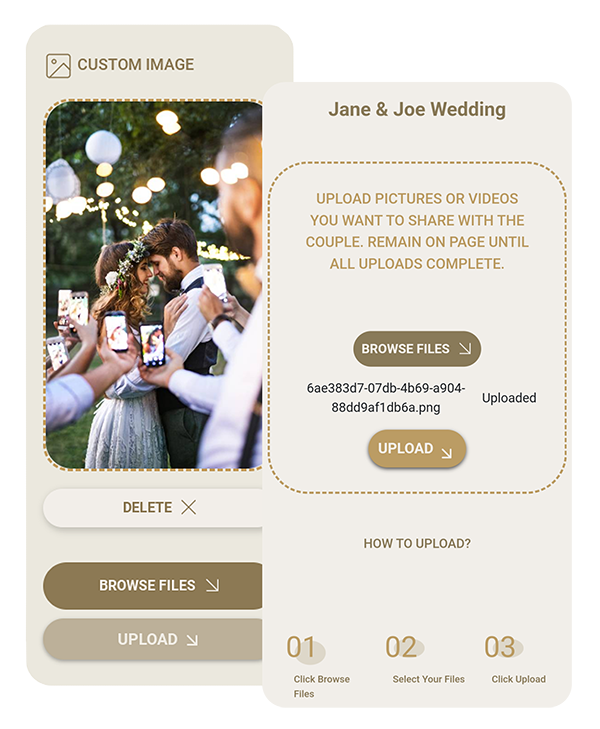
Capturing and sharing wedding memories has never been easier. One innovative method that’s gaining popularity is using a QR code for Google photo album. Learning how to make a QR code for a Google photo album streamlines the photo collection process, making it simple for guests to contribute their snapshots to a shared album. Lets explore how this technology is revolutionizing wedding photo sharing.
Understanding QR Codes for Photo Sharing
QR codes, or Quick Response codes, are two-dimensional barcodes that can be scanned using a smartphone camera. When it comes to photo sharing, these codes can direct users to a specific online album, making it effortless to view or contribute photos. How to make a Google photo album with QR code is becoming a beneficial skill for modern couples planning their weddings. By learning to create QR code for Google photo album, couples can establish easy access to their wedding memories.
Benefits of QR Codes for Wedding Photos
QR codes offer significant advantages for wedding photo sharing. They provide a modern and efficient way to collect memories from all your guests. Understanding how to make a QR code for a Google photo album can significantly enhance your wedding experience. Let’s explore the main benefits of using a QR code for Google Drive:
- Easy Access: Guests can quickly scan the code to access the album.
- Instant Sharing: Photos can be uploaded directly from smartphones.
- Centralized Collection: All photos are gathered in one place.
- No App Required: Most modern smartphones can scan QR codes without additional software.
- Original Quality: When you create QR code for Google photo album, it allows for unlimited uploads in original quality without compression.
- Privacy Control: Using a QR code to Google Drive ensures that you maintain ownership of all uploaded content.
Seamless Integration: The QR code can be easily shared via email or included on your wedding website.
Cost-Effective: This method offers a free way to collect and store a large number of high-quality photos and videos.
By taking advantage of these benefits, couples can ensure they capture a comprehensive collection of their special day. Learning how to make a Google photo album with QR code simplifies the photo-sharing process for both the couple and their guests. This technology enhances the overall wedding experience by making memory collection effortless and inclusive, while ensuring that every cherished moment is preserved in its original quality.
Streamlining Photo Sharing with Google Lens
The Google lens icon in many smartphone cameras has simplified wedding photo sharing. When you create a QR code for Google photo album, guests can use this built-in feature to quickly scan and access the album without needing a separate app.
For couples considering how to make a Google photo album with QR code, this technology offers a seamless solution. Guests simply open their camera app, point it at the code, and the Google lens automatically detects it, prompting them to open the linked album. This ease of use encourages more guests to participate in capturing and sharing memories, resulting in a more comprehensive collection of wedding photos.

How to Create a QR Code for Your Google Photo Album
Creating a QR code for Google photo album is a straightforward process. Many couples wondering how to create a wedding QR code find this method an efficient way to gather photos from their guests. Here’s a step-by-step guide on how to make a QR code for a Google photo album:
- Create a shared photo album in Google Drive
- Obtain the sharing link for your album
- Use a QR code generator to create a code for your link to create QR code for Google photo album
- Download and print the QR code for display at your wedding
Remember, when you create QR code for Google photo album, you’re providing an easy way for guests to contribute to your memories. This method makes sure you capture a wide range of perspectives and moments from your special day, creating a more comprehensive wedding album.
Maximizing the Use of QR Codes at Your Wedding
To make the most of your QR code photo sharing system, there are several strategies you can employ. First, display the QR code for Google Drive prominently at the reception, verifying it’s easily visible to all guests. Next, include clear instructions on how to make a Google photo album with QR code, making the process straightforward for everyone.
Creating a live photo wall where guests can see uploaded photos in real-time can add an interactive element to your reception, encouraging more participation. Finally, remind and encourage guests to use the QR code to Google Drive throughout the event to capture moments from the entire celebration.
Privacy and Security Considerations
When using a QR code for Google Drive or photos, it’s important to prioritize privacy and security. Your wedding photos are personal and intimate, and you’ll want to make sure they’re shared only with your intended audience. Understanding how to make a QR code for a Google photo album with proper privacy settings is helpful for protecting your memories. By taking a few precautionary steps, you can enjoy the convenience of digital photo sharing while maintaining control over your wedding album. Here are some privacy and security considerations to keep in mind:
- Set appropriate photo album permissions in Google Drive
- Use a secure QR code generator
- Regularly monitor album activity
- Consider using password protection for added security
With these features, you can enjoy the convenience of digital photo sharing while maintaining the intimate nature of your wedding photos. This method allows for easy sharing with guests while securing that your cherished memories remain under your control. Since guests do not need to download an app or create an account, it encourages more participation in capturing and sharing moments from your wedding. This ease of use, combined with robust privacy features, makes it an ideal solution for couples who want to collect a comprehensive set of wedding memories without compromising on security.
QR Code Photo Sharing Service Providers
While creating a QR code to Google Drive or photos can be a DIY project, many couples opt for a professional QR code service for wedding pictures to handle this aspect of their celebration. These services often provide a range of features to enhance the photo-sharing experience.
Many also include QR code analytics to track usage and engagement, giving you insights into how guests are interacting with the photo-sharing system. Integration with wedding websites and invitations is another common feature, providing a seamless experience for your guests. Additionally, these services often provide technical support for guests who may need assistance, so that everyone can participate in capturing your special moments.

The Future of Wedding Photo Sharing
We can expect to see more innovative uses of QR codes in wedding photography. From dynamic QR codes that can be updated in real-time to integration with digital business cards for wedding vendors, the possibilities are exciting. We may see the development of augmented reality features that allow guests to view and interact with photos in new ways.
Advancements in AI could lead to automatic photo organization and highlight reel creation, making it easier for couples to relive their special day. As smartphones continue to improve, we might also see enhanced capabilities for scanning and interacting with QR code for Google photo album, further simplifying the photo-sharing process at weddings.
About WedUploader: Simplifying Wedding Photo Collection
WedUploader is at the forefront of wedding photo sharing technology, offering a seamless way to collect and organize wedding photos. By providing a unique QR code for Google photo album, WedUploader makes it easy for guests to contribute their photos directly to the couples Google Drive. This makes sure every cherished moment is captured and stored securely, without the need for complex apps or login processes.
Couples who use WedUploader can create a QR code to Google Drive that allows for unlimited uploads in original quality. This service bridges the gap between professional photography and guest snapshots, guaranteeing that no moment goes uncaptured. Whether you’re looking to create QR code for Google photo album or seeking a comprehensive solution for wedding photo collection, WedUploader offers everything you need to know about QR code photo sharing for your special day.
With a focus on simplicity and privacy, WedUploader has become the go-to choice for couples who want to collect wedding pictures effortlessly. The services use of QR codes eliminates the need for guests to download apps or create accounts, making it accessible to everyone with a smartphone. Utilizing a QR code for Google photo album through services like WedUploader represents the perfect blend of technology and tradition, making sure your wedding memories are captured, shared, and preserved with ease.
Frequently Asked Questions