

Kululu and WedUploader are two popular ways to collect wedding photos from guests. Both let guests scan a QR code to share photos and videos from their phones, with no app required. The main differences are upload limits and what happens to the files after the reception.
Kululu vs. WedUploader at a Glance
Both platforms work in any phone browser and keep files in original quality, though Kululu reserves that for its paid plans. Where they split is how many photos guests can share, how long you keep them, and what one payment covers:
Kululu vs. WedUploader Comparison
| Feature | Kululu | WedUploader |
|---|---|---|
| Guest access | QR code or link, no app or account | QR code or link, no app or login |
| Where uploads go | Kululu digital album | Live album gallery, originals saved to your Drive |
| Pricing model | Free, Plus, and Pro plan | One-time purchase covering unlimited albums |
| Upload limit | 100 on Free, 500 on Plus, unlimited on Pro | No limit |
| Upload window | 24 hours (Free), 1 month (Plus), or 3 months (Pro) | No expiration |
| Access after the event | 7 days (Free), 90 days (Plus), or 1 year (Pro) | Files stay in your Drive |
| Photo quality | Slightly compressed on Free, original on paid plans | Original quality |
| Multiple events | 3 sub-albums on Free and Plus, unlimited on Pro, one QR code | Unlimited albums, each with its own QR code |
| Live slideshow | Live photo wall on every plan | Real-time or curated fullscreen slideshow photo wall |
| Guest messages | Captions, text posts, video wishes | Guestbook messages and voicemails |
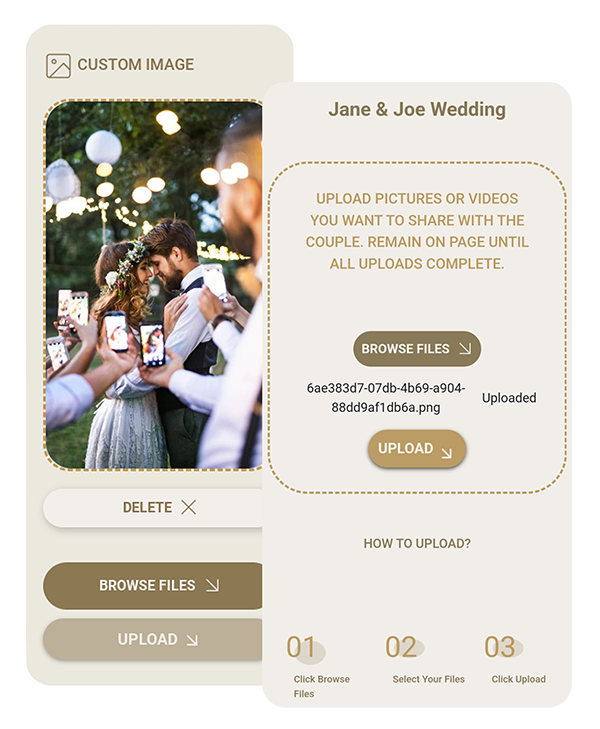
WedUploader Makes Collecting Your Wedding Photos Easy & Simple
Relive your big day through the eyes of your beloved ones.
Where Your Wedding Photos End Up
Kululu saves uploads to a private digital album that you and your guests can browse and download. The Free plan keeps them for 1 week, the Plus plan for 3 months, and the Pro plan for 1 year. Before that access ends, you’ll want to grab everything with the one-click ZIP download.
WedUploader also gives guests a live album gallery, where they can scroll through everyone’s photos and videos as they come in. Every file also lands in a folder in your connected Google Drive account the moment a guest uploads it, and you’ll get an email each time something new arrives. You own the files, and you never lose access.
Since the originals already live in your account, you can share the Drive folder with family whenever you like. Google includes 15 GB of free storage with every account.
Upload Limits and Upload Windows
Kululu sizes its plans around how many photos you expect. There’s no guest cap, but Kululu’s pricing page suggests the Free plan’s 100-upload limit suits small events of 10 to 20 people. Plus allows 500 photos and videos, which should cover events with up to 100 guests, and Pro allows unlimited uploads. Once an event hits its cap, new uploads stop until you upgrade or delete files.
Guests get 24 hours to upload on Free, 1 month on Plus, and 3 months on Pro. Photos on the Free plan are also slightly compressed to keep load times fast. Most photo compression is “lossy,” meaning it shrinks the file by permanently removing some of the original image data, as Adobe explains.
WedUploader doesn’t cap uploads or close the album, so a guest who forgot to share photos the night of your wedding can still add them months later in original quality.
Pricing and What One Purchase Covers
Both platforms charge couples a one-time fee rather than a subscription fee. Prices change and vary by currency, so check each site for current numbers.
Kululu prices by event. Every event starts on the Free plan, and you can upgrade that event to Plus or Pro, though only Pro removes the upload and sub-album caps. Kululu also offers a money-back guarantee and monthly plans for planners who run lots of events.
With WedUploader, a single purchase includes all premium features for every album on your account. That makes it the value pick if you’re collecting photos from your engagement party, bridal shower, bachelorette weekend, and wedding day. Each album has its own link and QR code, and the albums aren’t connected, so each party’s photos stay with that party’s guests. Kululu instead groups photos into sub-albums within a single event under a single QR code, and Free and Plus stop at 3.
Wedding-Day Features
Kululu puts its live photo wall front and center, and it’s included even on the Free plan. Guests can add captions, decorated text posts, or video wishes, and a newer Likes feature lets everyone vote for favorite shots. Pro adds manual upload approval and automatic content moderation, handy for public events where you’d rather check every photo first.
WedUploader’s fullscreen slideshow turns a TV or projector into a live photo wall as guests upload, or you can run a curated version instead. Guests can sign the digital guestbook or leave a voicemail, and you choose which photos appear in the gallery and which stay private. The album page can match your wedding colors, too, with a personalized link that’s easy for guests to remember.
Picking Between Kululu and WedUploader
Both platforms make it easy for guests to share and browse photos. The right pick depends on your event and what happens after it ends:
When Kululu Makes Sense
- You’re hosting a small get-together, and the Free plan’s 100 uploads and 24-hour upload window cover it.
- You’d like guests to vote for favorite photos, turning the reception into a mini photo contest.
When WedUploader Makes Sense
- You want guests to enjoy a live gallery while the originals save to your own Google Drive.
- You’re collecting photos from several celebrations and want one purchase to cover every album.
- You don’t want to count uploads or watch an expiration date.
WedUploader skips the after-wedding homework, with no ZIP file to download before a deadline. Every photo is in your Drive the moment a guest uploads it, and your album never expires, so you can relive the night years from now. Our comparisons of Guestpix vs. WedUploader and GuestCam vs. WedUploader cover two more options.
Collect Every Guest Photo with WedUploader
Your guests’ photos should outlast any storage plan. With WedUploader, one purchase covers every celebration from the engagement party to the wedding day, each with its own album and QR code. Guests share with no app or login, and every file saves to your Google Drive. Create your first album today.
The #1 Simple & Easy Way to Collect Wedding Photos & Videos From Your Guests
Frequently Asked Questions
Is Kululu or WedUploader cheaper for a wedding?
Whether Kululu or WedUploader is less expensive depends on your events and photo count, since Kululu charges per event, while one WedUploader purchase covers unlimited albums. Kululu reserves unlimited uploads for its Pro plan, while WedUploader never caps them.
What happens to my photos after the wedding?
What happens to your photos after the wedding depends on the platform you pick. Kululu keeps your photos for 7 days on the Free plan, 90 days on the Plus plan, or 1 year on the Pro plan, while WedUploader saves them to your Google Drive until you delete them.
Can I use WedUploader for my engagement party and shower too?
You can use WedUploader for your engagement party, shower, and any other celebration by creating a separate album for each one. Each album gets its own QR code, and a single purchase covers them all. More on how to get guests to upload photos.
Disclaimer: Kululu information accurate as of Nov. 2026. Please see Kululu’s website for the most up-to-date information.