

Somewhere between booking vendors and building your wedding website, you’ve probably heard of both The Knot and WedUploader. You might have a rough idea of what each one does, but it’s not totally clear which one is the better pick for collecting wedding photos. The short answer is that these two tools do different jobs. The Knot is an all-in-one planning hub, while WedUploader is built for one thing: collecting your guests’ photos and videos.
What The Knot Brings to Wedding Planning
The Knot has been a go-to for engaged couples for years, and its free tools cover a lot of ground. You can build a wedding website, handle RSVP management, keep your guest list in order, set up a registry, and order invitations, all from one account or the app. Its vendor marketplace is also handy when you’re comparing photographer options, booking a venue, or lining up a DJ.
Photos do show up on The Knot, just not from your guests. The website builder lets you add a photo gallery or a timeline of your relationship, so it’s a great spot for engagement photos. For guest uploads, The Knot once offered a photo app called The Guest, but it’s no longer available. Today, The Knot’s own advice is to link a photo folder to a QR code and add it to your table numbers, or to use a dedicated QR photo site.
WedUploader Makes Collecting Your Wedding Photos Easy & Simple
Relive your big day through the eyes of your beloved ones.
What WedUploader Does for Guest Photos
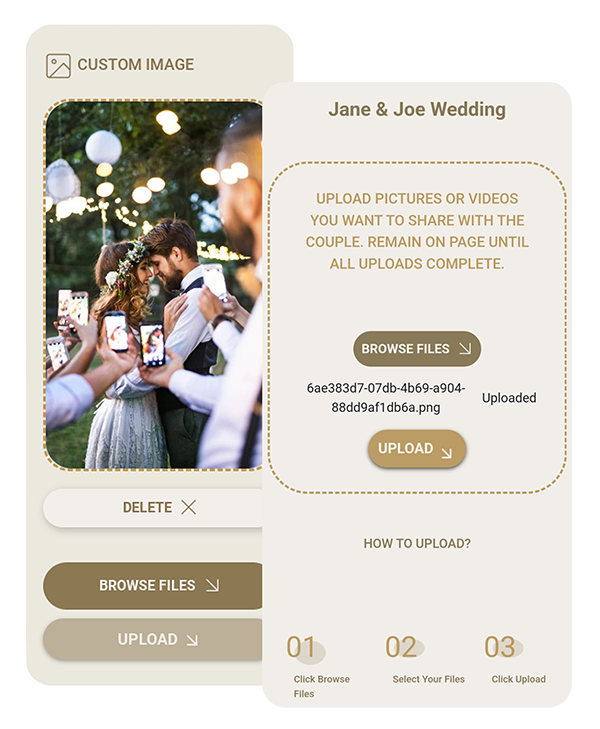
WedUploader exists to get every guest photo and video from your celebration into one place you control. Setup takes three steps: you sign up, connect your Google Drive account, and create an album. Then you get a link and QR code to share with guests, and everything they upload goes straight into a folder in your Drive.
Guests don’t need to download an app, create an account, or log in. They scan, pick their photos, and they’re done, which keeps the guest experience easy for everyone from grandparents to your most tech-savvy friends. Every file arrives in its original quality, and there are no storage limits or guest caps. You can also create separate WedUploader albums for your engagement party, shower, bachelorette, rehearsal dinner, and wedding day to keep everything organized.
The Knot vs. WedUploader for Wedding Photo Sharing
Since The Knot focuses on planning and WedUploader focuses on photos, it helps to compare QR uploads and everything around them side by side. The main differences come down to how guests share, where photos live, and what you get at the reception:
The Knot vs. WedUploader for Guest Photos
| Feature | The Knot | WedUploader |
|---|---|---|
| Guest photo uploads | No built-in guest upload tool | Browser uploads via QR code or link |
| Guest requirements | Former photo app required a download | No app, account, or login |
| Where photos live | Couple-posted photos on wedding website | Couple’s own Google Drive folder |
| QR codes | Free on The Knot stationery | Included with every album, plus printable signs |
| Cost | Free planning tools | Free for guests, one-time purchase for couples |
| Reception extras | No photo-specific reception features | Live slideshow, gallery, guestbook, voicemail |
| Best fit | Website, RSVPs, registry, vendor search | Collecting guest photos and videos |
Guest Uploads and Access
With WedUploader, guests scan a QR code or tap a link, land on a simple upload page, and upload from whatever browser their phone already has. That works for almost everyone on your guest list, since Pew Research Center reports that about nine in ten U.S. adults own a smartphone. The Knot doesn’t have a built-in way for guests to upload photos right now, and its retired app required a download.
The Knot’s editors have listed WedUploader as a QR code photo option to fill that gap, noting that it works with QR codes or private links, needs no app, and never expires.
Photo Ownership and Storage
Every photo and video goes directly to your personal Google Drive storage, so the files belong to you from the moment they’re uploaded. Your storage space comes from your Google account, and every account includes up to 15 GB shared across Gmail, Drive, and Photos. If your guests are extra snap-happy you can add more room with a Google One plan at any time. You’ll also get an email when new files arrive, so you always know what’s coming in.
Cost and Commitment
The Knot’s planning tools are free, which is a big reason so many couples use them. WedUploader is always free for guests. For couples, a one-time purchase unlocks premium features for every album on your account, with no subscription and no expiration date. One purchase covers the shower, the wedding, and every party in between.
Reception Extras
WedUploader adds a few fun features for the big day. A fullscreen slideshow puts guest photos on venue screens like a TV or projector as they’re uploaded. You can also turn on a hosted live gallery, which lets guests scroll through everyone’s photos and videos as they’re uploaded. Guests can also leave messages in a digital guestbook or record a voicemail for you. The Knot doesn’t offer photo features like these for the reception itself.
Using The Knot and WedUploader Together
When you’re searching for wedding photo sharing tools and come across The Knot and WedUploader, you don’t have to pick one or the other. Plenty of couples plan with The Knot and collect photos with WedUploader, and the two work well side by side.
Start by adding a page to your wedding website on The Knot with your WedUploader album link so guests can find it before, during, and after the wedding. If you’re ordering stationery from The Knot, its QR codes are free and can point to any website, so you can add your album’s QR code to table numbers, programs, or signs. Your WedUploader event information page can also link back to your wedding website and registry, giving guests one spot for everything they need.
Picking the Right Wedding Photo Sharing Option
If you need help planning, The Knot is a solid choice for your website, RSVP management, registry, and vendor search. For collecting guest photos, a dedicated tool does the job better. WedUploader keeps your photos in your own Google Drive, preserves original quality, and gives guests a no-app, no-login way to share. That combo is hard to beat for capturing the candid moments you’d otherwise miss. Still weighing other photo apps? Our GuestPix vs WedUploader comparison and our roundup of wedding photo sharing services show how other options stack up.
Pair The Knot with WedUploader for Wedding Photo Sharing
Keep planning with The Knot and let WedUploader handle the photos. Guests scan a QR code, upload without an app or login, and every photo lands in your Google Drive in original quality. Create your first album with WedUploader today.
The #1 Simple & Easy Way to Collect Wedding Photos & Videos From Your Guests
Frequently Asked Questions
Does The Knot have a guest photo sharing app?
The Knot doesn’t currently have a guest photo sharing app, since its former app, The Guest, is no longer available. Most couples use a QR code photo tool instead, which lets guests upload right from their phone’s browser.
Can I use WedUploader with my wedding website on The Knot?
You can use WedUploader alongside your website on The Knot by adding your album link to a page on the site. You can also put your album’s QR code on stationery ordered through The Knot, like table numbers or programs.
Is WedUploader free for wedding guests?
WedUploader is free for wedding guests to use. They don’t need to download an app, create an account, or log in to upload photos and videos.